

The Problem with Portfolio Sites
I had let mine go stale for months. I’d shipped projects, written posts, earned certifications, and none of it showed up because updating the site meant carving out time I never had. At some point I stopped pretending discipline was the answer and just automated the whole thing.
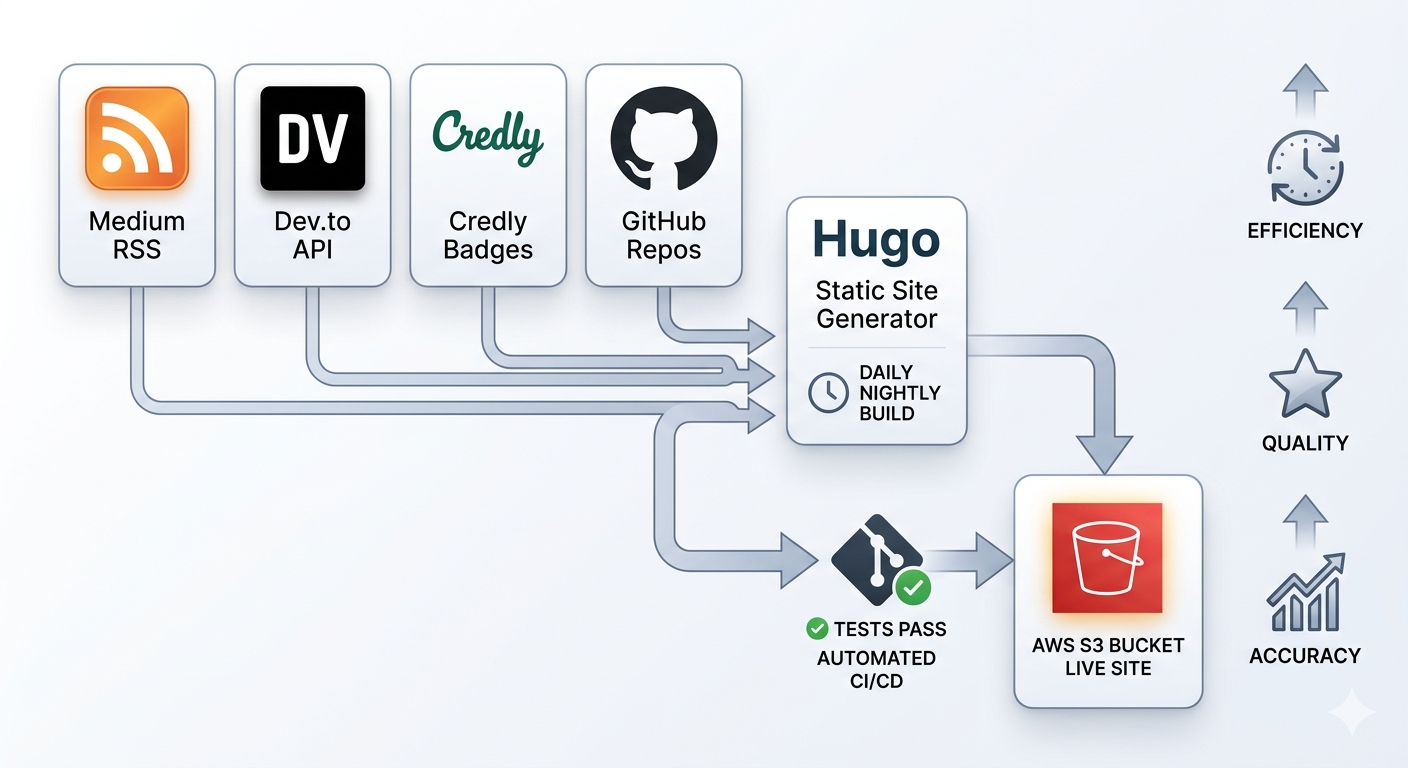
This post covers how I wired four external data sources into a Hugo site that updates itself nightly, with a CI/CD pipeline that tests, builds, and deploys without me touching anything.
How Hugo Fits In
Hugo is a static site generator that takes content, templates, and data files as input and spits out HTML. The data files part is what makes this whole approach work.
Drop JSON files into a data/ directory and Hugo makes them available to every template via site.Data. So instead of hardcoding anything about my projects or certifications, the site reads from four JSON files that get generated fresh on every build. None of those files live in the repo. They’re created at build time, used by Hugo, and that’s it.
data/medium.json   (blog posts from Medium)
data/devto.json    (articles from Dev.to)
data/credly.json   (certifications from Credly)
data/github.json   (pinned projects from GitHub)
Before getting into the pipeline, it helps to understand where each of these comes from.
Four Sources, Four Scripts
Each source has a small Python script that fetches data and normalizes it into a consistent shape. I deliberately avoided third-party HTTP libraries, using Python’s standard urllib.request throughout. Fewer dependencies means fewer things to break.
Medium publishes an RSS feed at https://medium.com/feed/@username. The script parses the XML with xml.etree.ElementTree and tries four different places to find a thumbnail: media:thumbnail, media:content, enclosure, and finally the first <img> tag in the content body. It is surprisingly rare for all four to be missing.
Dev.to has a proper REST API at https://dev.to/api/articles?username=username that returns a clean JSON array. The script normalizes it to the same shape as the Medium output so both feeds can be merged and sorted by date in the template without any special handling.
Credly exposes a public badges endpoint at https://www.credly.com/users/{user-id}/badges.json. The script filters to accepted, public badges only and pulls the badge name, issuer, issued date, and image URL.
GitHub’s public repos API at https://api.github.com/users/{username}/repos returns everything. The script filters out forks and archived repos, sorts by stars, and supports a pinned list so specific projects always appear first regardless of their star count. That last bit matters, because some of the repos I’m most proud of have fewer stars than things I threw together in an afternoon.
Each script exits non-zero on any failure. If an API is down or returns something unexpected, the GitHub Actions step fails, the build stops, and nothing broken gets deployed.
Now for the pipeline that ties it all together.
The GitHub Actions Pipeline
The workflow has three jobs: test, build, and deploy.
on:
  push:
    branches:
      - main
      - dev
  pull_request:
    branches:
      - main
  schedule:
    - cron: "0 3 * * *"
The scheduled run is the important one. Every night at 3am UTC the workflow fires without any code change, fetches fresh data from all four sources, builds the site, and deploys it. If I publish a new article on Medium today, it appears on the site tomorrow without me doing anything.
test runs first and only runs unit tests. Each fetch script has its own test suite covering happy paths, error handling, date formatting edge cases, and the main() exit behavior. If a script is broken, the tests catch it before it ever runs against a real API.
build runs after tests pass. It fetches from all four sources, runs integration tests against the generated JSON (schema validation, required fields, that sort of thing), builds Hugo, and uploads the public/ directory as a GitHub Actions artifact.
- name: Upload site artifact
  uses: actions/upload-artifact@v4.6.2
  with:
    name: hugo-site
    path: public/
    retention-days: 1
deploy downloads that artifact and syncs it to S3. It never fetches data or rebuilds anything. It just takes what build produced and ships it. Before the sync runs, there’s a guard:
- name: Deploy to S3 bucket
  run: |
    test -f public/index.html || (echo "public/index.html missing, aborting sync" && exit 1)
    aws s3 sync public/ s3://ajaydhungel.me/ --delete
That check exists because --delete removes anything in S3 that isn’t in public/. If Hugo failed silently and left an empty directory, without the guard the sync would wipe the live site clean. I learned to be paranoid about that one early.
Authentication is OIDC throughout, so there are no static AWS credentials sitting in GitHub secrets. GitHub generates a short-lived token per run, and an IAM role with a trust policy scoped to the repo handles the rest.
Plugging Into Hugo Templates
On the Hugo side, templates read from site.Data.medium, site.Data.devto, and so on. The blog feed merges Medium and Dev.to, sorts by date, and renders as a grid:
{{- $medium := slice -}}
{{- $devto := slice -}}
{{- with site.Data.medium }}{{- $medium = .items -}}{{- end -}}
{{- with site.Data.devto }}{{- $devto = .items -}}{{- end -}}
{{- $items := $medium | append $devto -}}
{{- $items = sort $items "pubDateRaw" "desc" -}}
{{- range $items -}}
  <a href="{{ .link }}">{{ .title }}</a>
{{- end -}}
The pubDateRaw field is ISO 8601 so sorting works correctly across both sources regardless of how the original dates were formatted. The display version (pubDate) is pre-formatted by the fetch script, so the template just renders it.
The same pattern applies to certifications and projects. The templates don’t care where the data came from, they just range over a list.
Branch Protection Keeps It Honest
The repo has two protected branches. dev requires both test and build to pass before anything can be pushed. main requires a pull request on top of that, plus both jobs passing.
The public/ and data/ directories are in .gitignore. Generated output has no place in version control, because it causes merge conflicts between branches and gives a false impression that the site content is pinned to a specific state when it isn’t. The authoritative copy lives in S3, built fresh from whatever the APIs return at the time of the build.
What Updates Itself and What Doesn’t
Blog posts on Medium and Dev.to, certifications on Credly, and GitHub project stats like stars, descriptions, and last updated dates all update automatically within 24 hours of changing on the source platform.
Adding a new page, changing the layout, updating the about section, those still go through git and a PR. That’s the right place for intentional changes to the site itself.
The line I drew is: data that lives somewhere else and I’d want reflected here goes through the fetch pipeline. Content that is original to this site goes through git. That distinction has held up cleanly and I haven’t felt the need to revisit it.
Now the portfolio is a side effect of doing the actual work. Write a post, it shows up. Earn a certification, it shows up. Ship something on GitHub, it shows up. And just like that, the guilt about the stale portfolio is gone.
That’s all for now! Thank you so much for making it to the end.